
MAK CASEFLOW / ONLINE CLIENT INTAKE
Canadian immigration intake. One clear place.
Caseflow is MAK Canadian Immigration Services’ client-intake portal. Retained clients can answer application questions, upload requested records and see what their file still needs.
Portal access is for retained MAK clients, not public self-registration. New to MAK? See how the Immigration Scanner, consultation and Caseflow work together →
See how digital immigration intake works
Watch the questionnaire, document requests and example client dashboard.
INSIDE THE PORTAL
This is what your file looks like.
Real screens from Caseflow, shown with a fictional demonstration client. One dashboard presents your application, its current status, your documents and the next steps — so you are never left guessing where things stand.
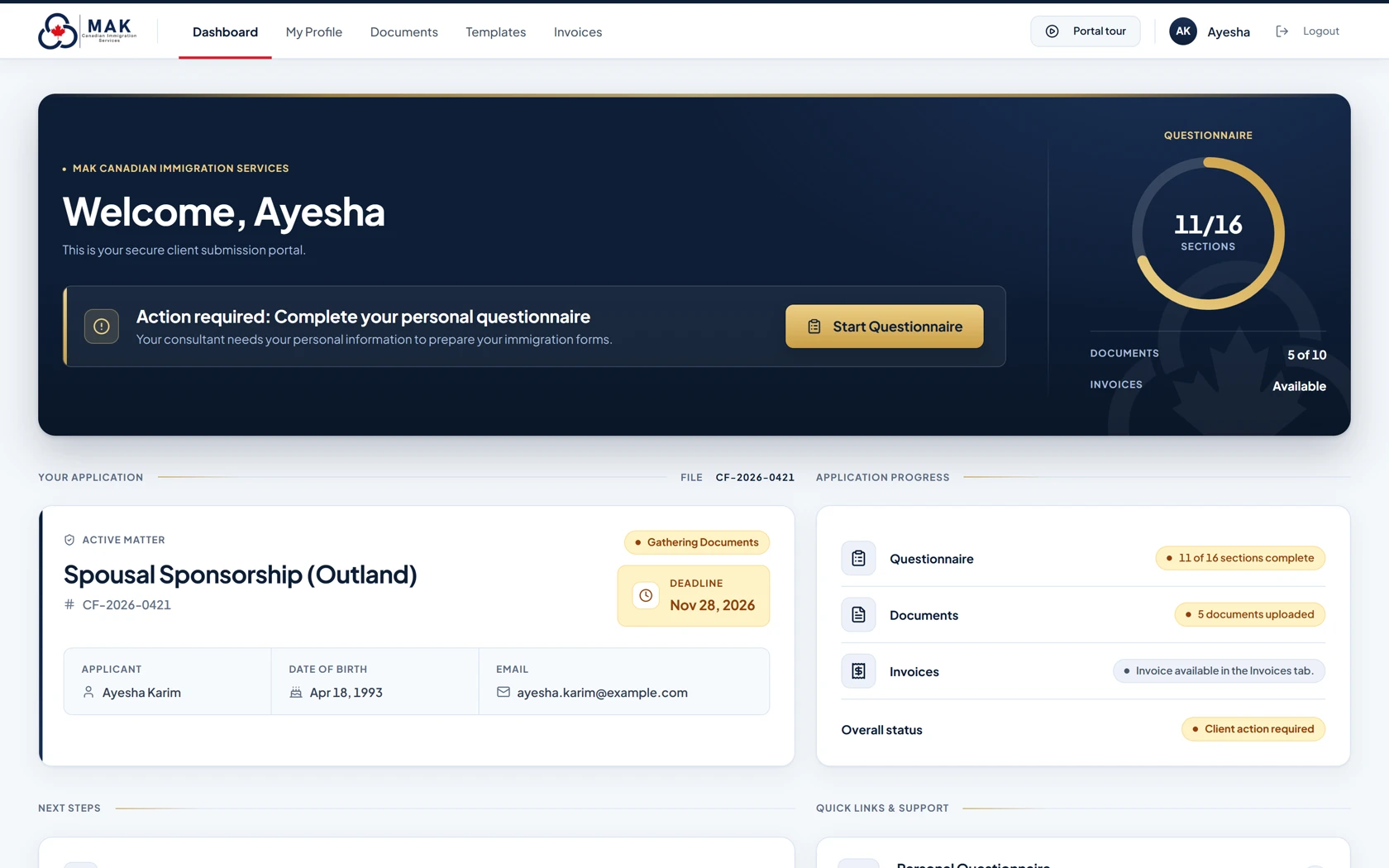
Every screenshot on this page shows a fictional demonstration client — never real client data
Guided questionnaire
One questionnaire, tailored to your application.
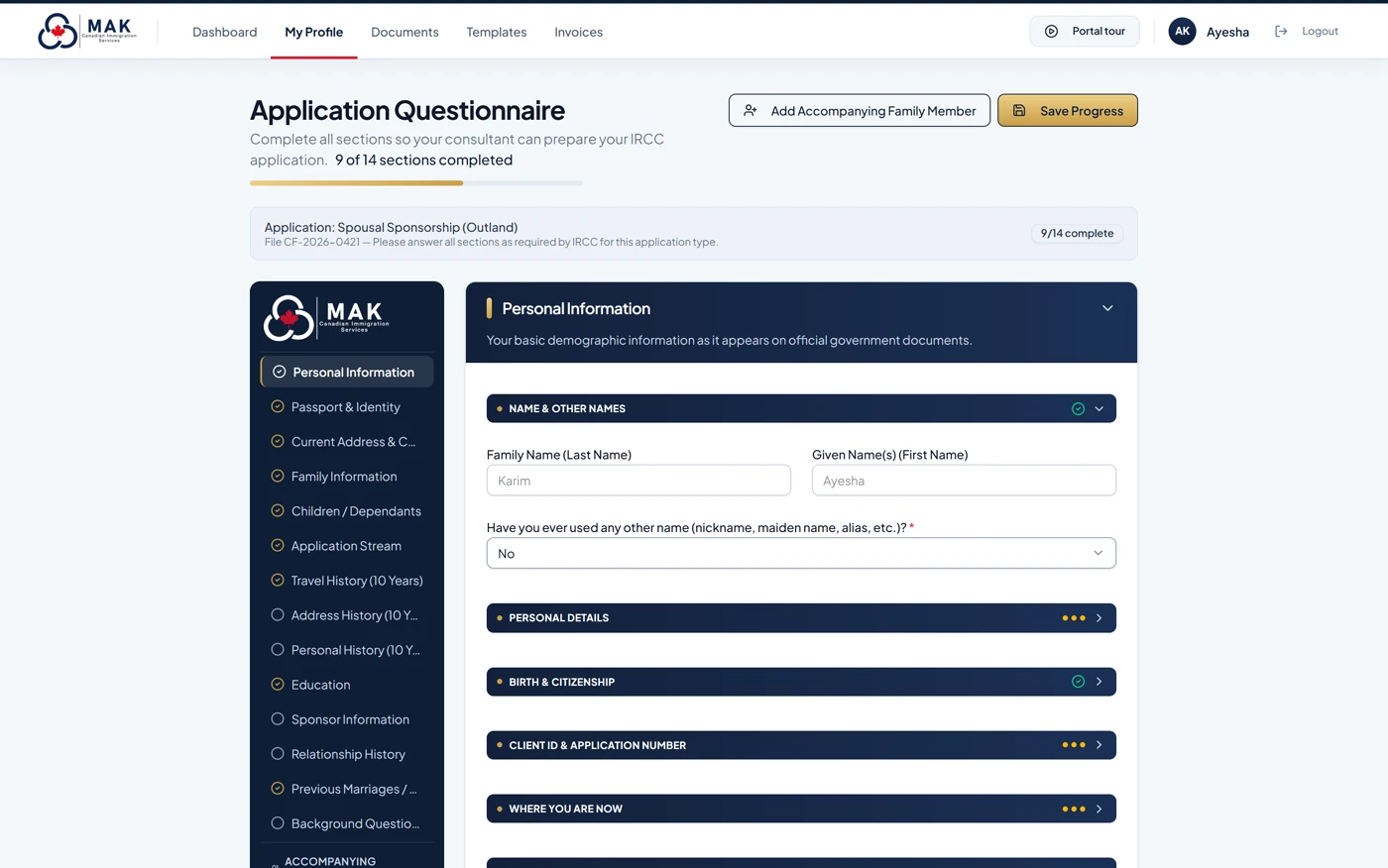
Clear, titled sections replace blank government forms. Where your file includes the questionnaire, you answer once and your consultant prepares your forms from it.
- Sections match your application type — sponsorship, study, work, Express Entry and more
- Answers save as you work, so you can stop and continue any time
- Field hints and simple checks catch gaps early
- Accompanying family members get their own sections
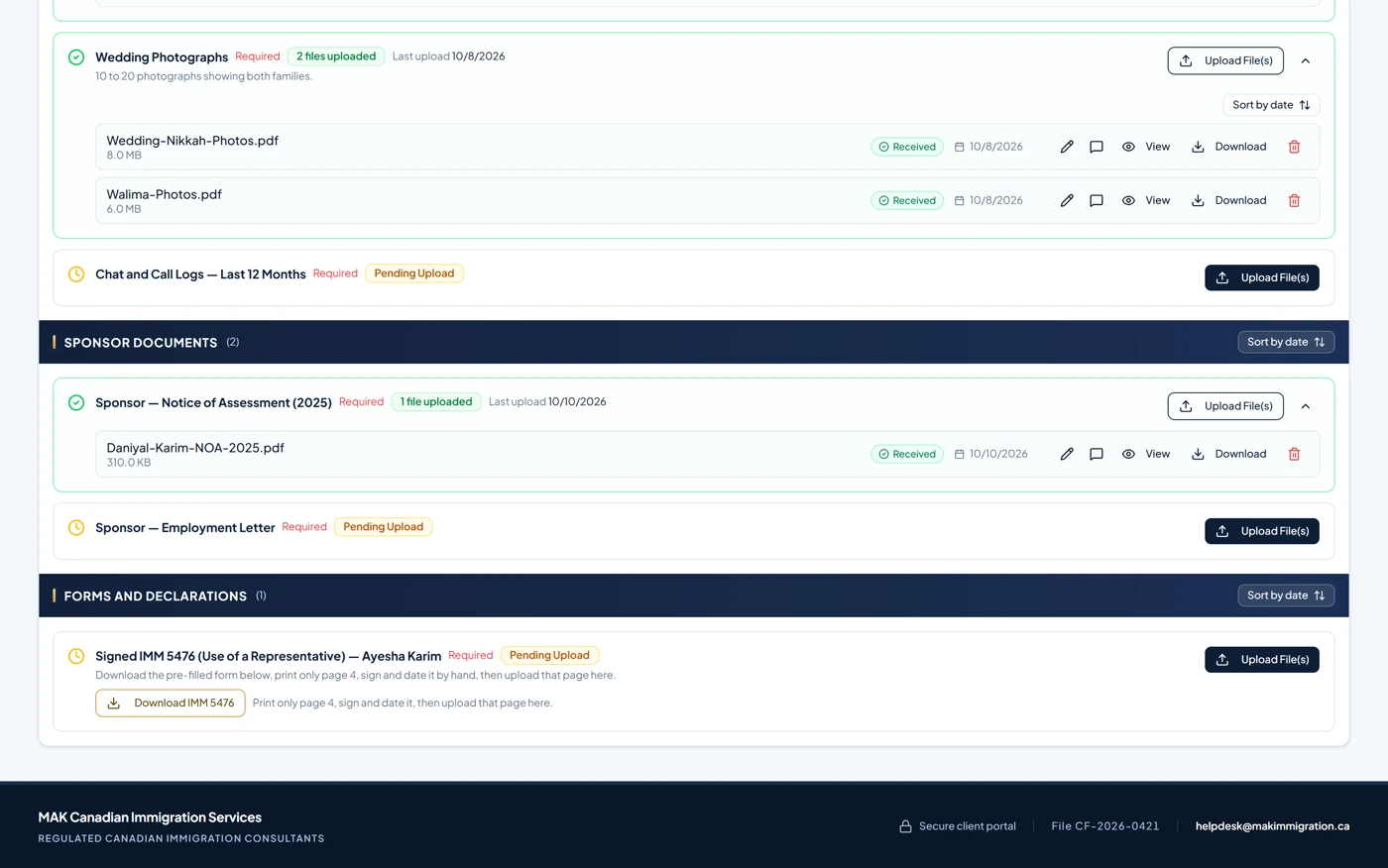
Document checklist
Exactly what we need — and what we have received.
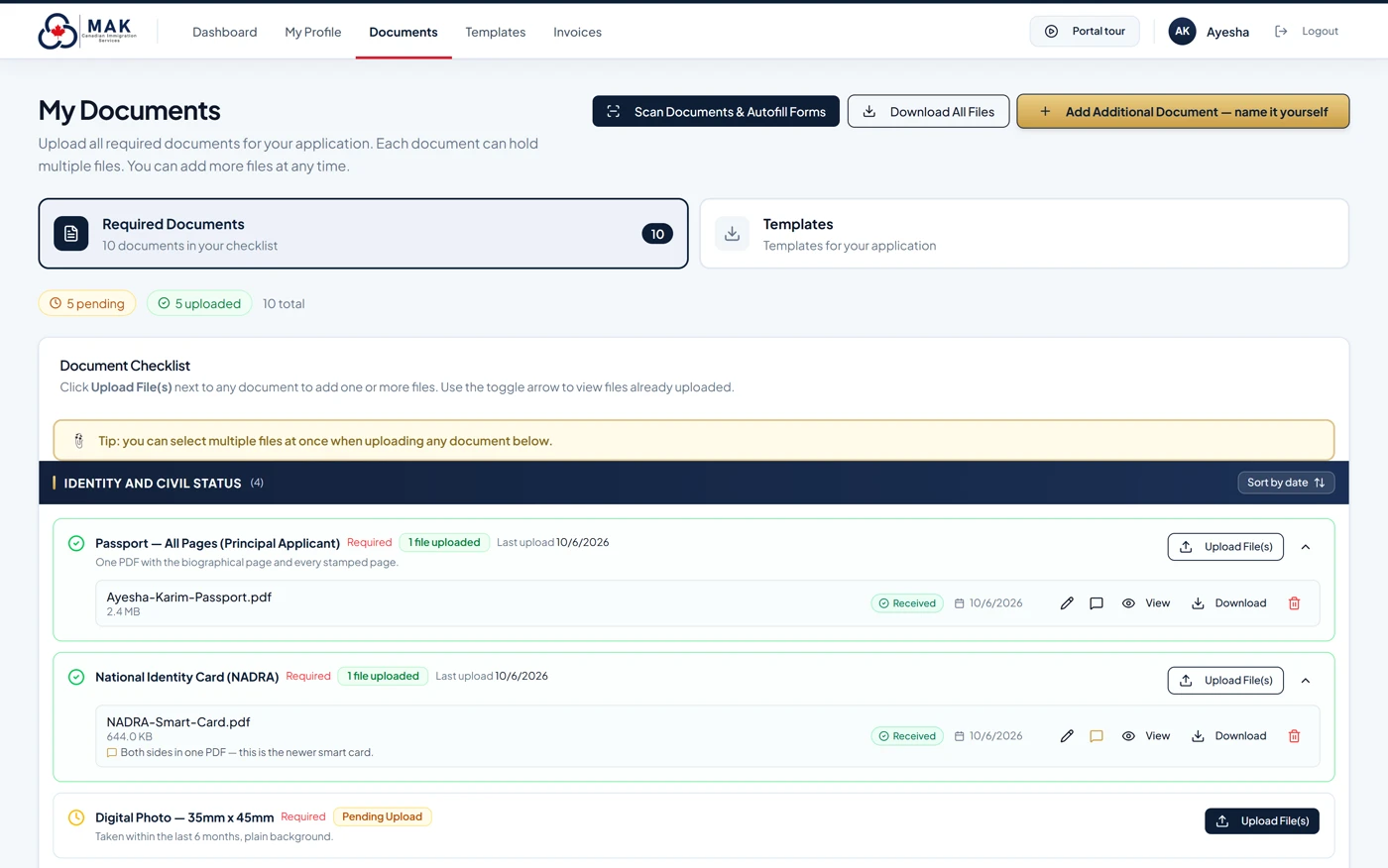
The documents requested for your file appear as a clear checklist, grouped and explained, with the status of every item.
- Upload from a phone or computer — photographs of documents are fine
- Every stored file shows a dated “Received” confirmation
- Add your own documents and leave notes for your consultant
- Download your documents as one organized package
Document read-assist
Upload a document. Watch answers fill in.
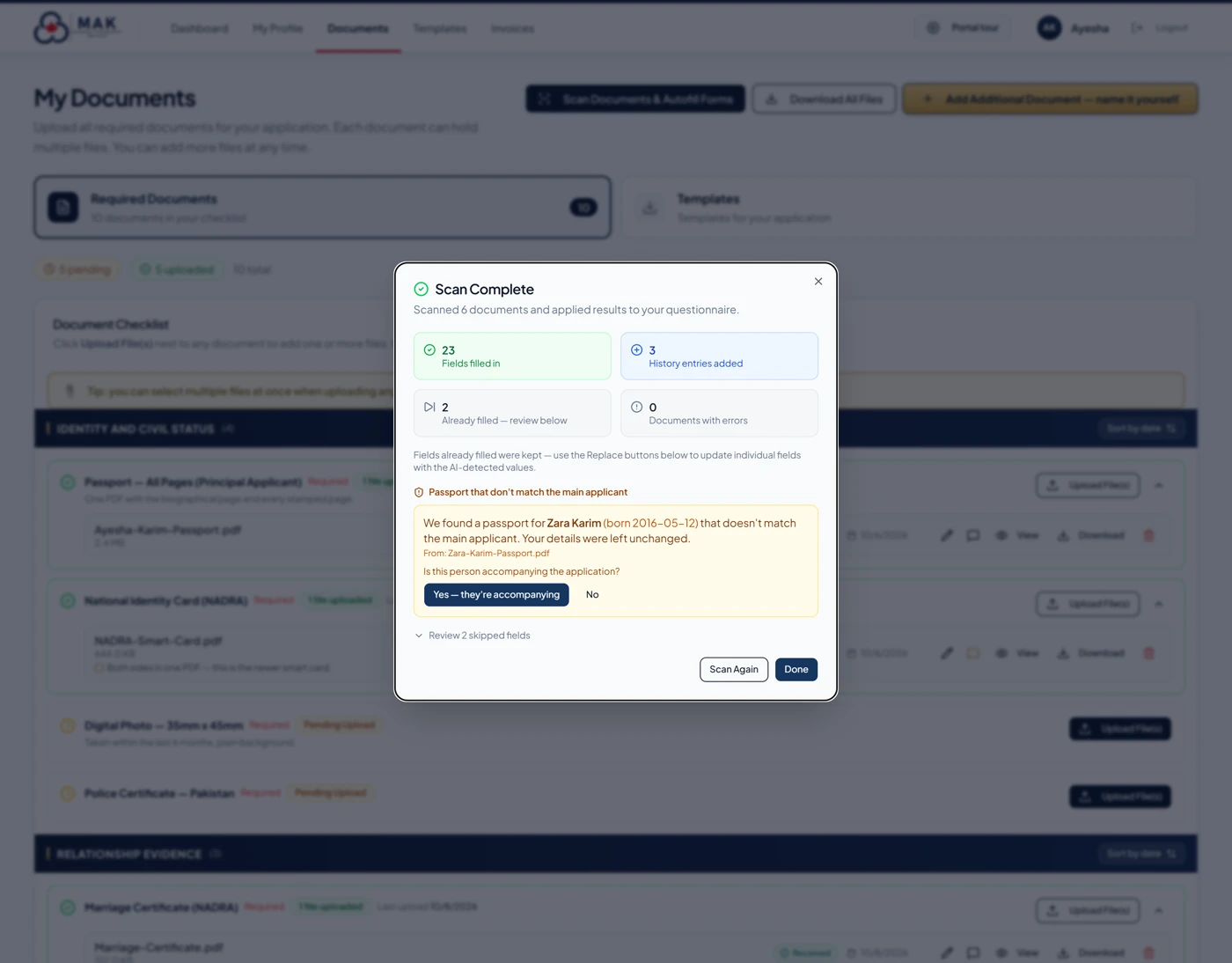
For supported uploads, Caseflow reads what you provided and suggests matching questionnaire answers — passport details, education, addresses, travel history.
- Each suggested answer names the document it came from
- Answers you already gave are never overwritten — you choose what to replace
- Your RCIC reviews the information; read-assist decides nothing
Forms & signature pages
Prepared forms, ready for your signature.
Where IRCC requires a handwritten signature — such as the IMM 5476 Use of a Representative form — Caseflow hands you the form prepared from your own answers.
- Print one page, sign and date it, then upload it back
- A consent step records your authorization
- Prepared forms and downloads depend on your file and service
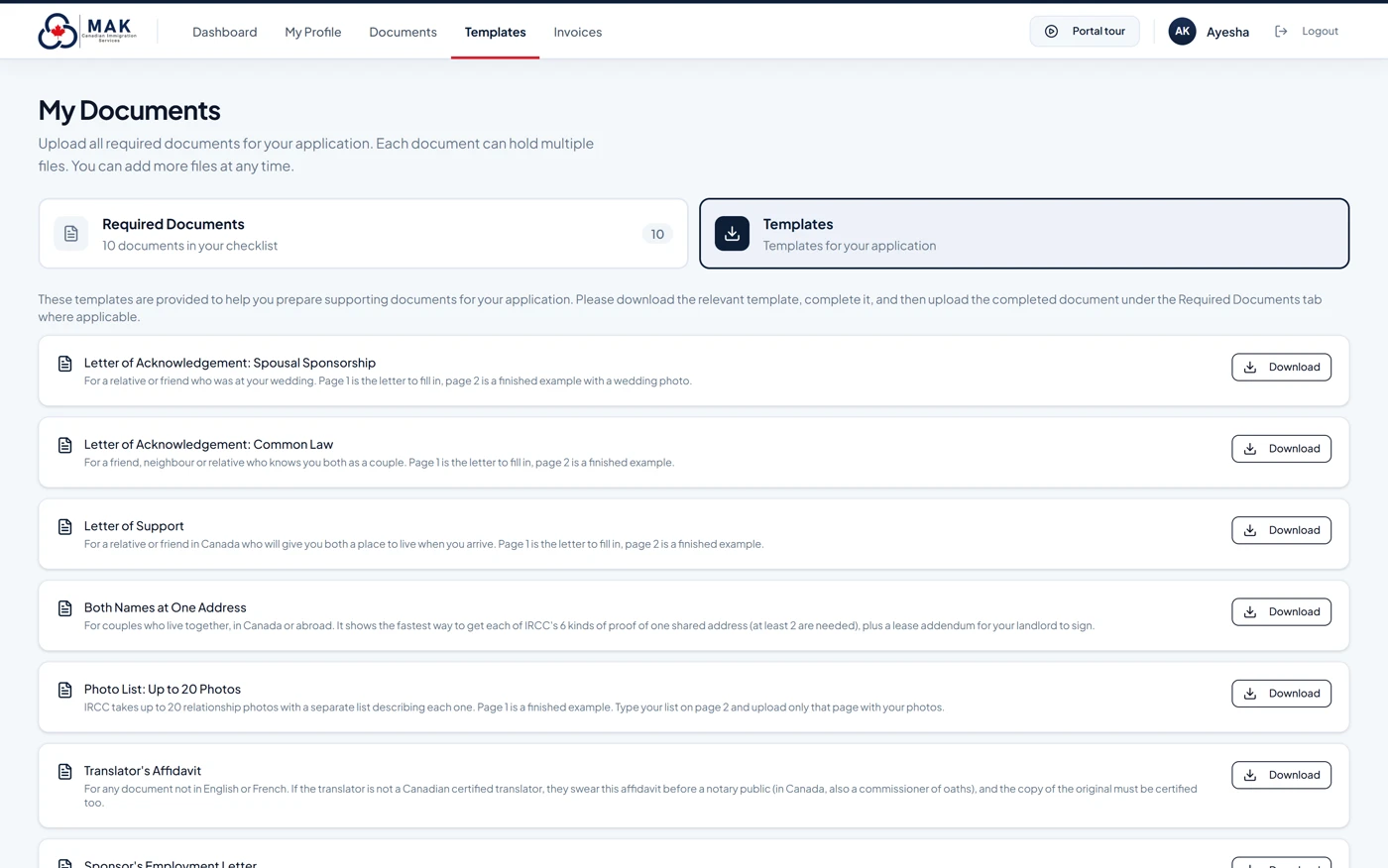
Templates & guides
Supporting documents, already drafted.
Reference letters, proof-of-address guides, photo lists and more — provided as templates for your application type, each telling you where it belongs on your checklist.
- Written for the evidence IRCC actually asks for
- Download, complete and upload to the matching checklist row
- Templates offered depend on your application type
Document read-assist may automatically populate some questionnaire fields; other results may require a replacement choice. Extracted details are not verified facts or immigration decisions. Clients must check their answers, and their assigned RCIC remains responsible for professional review. Features shown depend on the file and the service retained; not every feature applies to every engagement.
ON YOUR PHONE
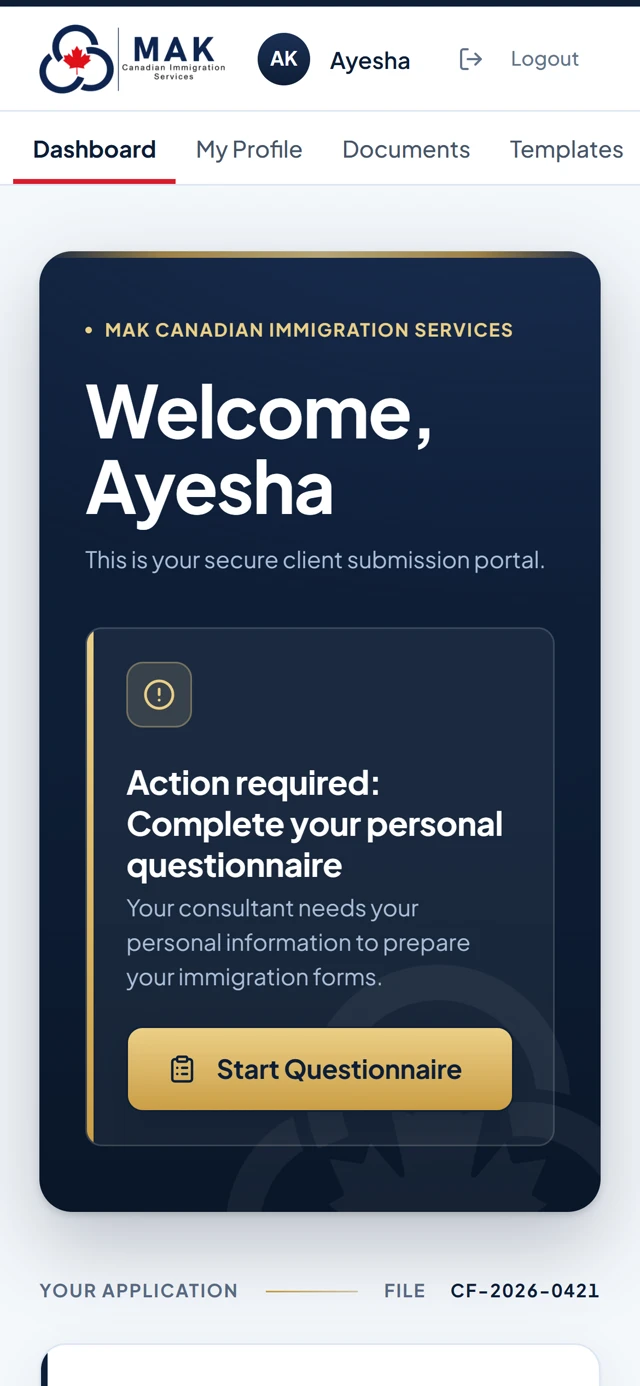
The whole portal, in your pocket.
Photograph a document and upload it on the spot. Check your file from anywhere. Finish a questionnaire section whenever you have a few minutes.
- Sign-in confirmed with a one-time code sent to you
- Access is set up by MAK for retained clients — no public registration
- The same file on your phone and your computer
FROM CONSULTATION TO INTAKE
A clearer process from the beginning.
Caseflow supports the professional service you have retained MAK to provide. It does not replace a consultation, service agreement or individual assessment.
Discuss your matter
Start with advice about your immigration goals and the service appropriate to your circumstances.
Receive file access
Once retained and set up, use the client-portal instructions supplied by MAK.
Supply information
Answer the questions and provide the supporting documents requested for your particular file.
Work with your consultant
MAK prepares and reviews the work included in your service agreement and requests further information as needed.
Illustrative process, not a promised timeline, universal checklist or automated immigration eligibility decision.
DIFFERENT MATTERS, DIFFERENT RECORDS
Immigration evidence is not one-size-fits-all.
The information a client may need to provide depends on the immigration pathway and the service purchased. Examples include:
FAMILY
Spousal and family sponsorship
Identity, relationship history, civil status and supporting evidence relevant to the sponsorship file.
Learn about sponsorship ↗ECONOMIC
Express Entry and work experience
Employment histories, dates and documents used to reconcile work and education information.
Learn about Express Entry ↗BUSINESS
Entrepreneur and financial evidence
Ownership information, capital records and financial evidence where relevant to the engagement.
Learn about source of funds ↗These illustrate possible evidence categories, not a claim that every client gets the same questionnaire or service.
AN IMPORTANT DISTINCTION
Digital organization. Human professional judgment.
A convenient electronic intake does not itself establish eligibility, confirm evidence sufficiency or decide a Canadian immigration application.
Caseflow helps organize
- Intake answers and relevant personal information
- Requested supporting documents and uploads
- Outstanding file-related items
- Prepared forms, invoices and receipts
Professional work remains human
- Case-specific advice within the agreed services
- Interpretation and assessment of relevant evidence
- File preparation and review under the agreement
- Official decisions by IRCC or other authorities
MAK’s registered immigration consultants include Usman Khalil (RCIC R709592) and Omer Khalil (RCIC R710149). The assigned professional depends on the client’s engagement. Verify consultant registration with CICC.
COMMON QUESTIONS
Using MAK’s online immigration intake.
Clear answers about access, documents and what this client portal does not do.
Does MAK offer online intake for Canadian immigration clients?
Yes. MAK uses Caseflow for retained clients to complete online questionnaires, provide requested records and work through file-related tasks. The available requests and services depend on the particular engagement.
Can I sign up for Caseflow before becoming a client?
No. Caseflow is not a public registration system. The firm sets up access for retained clients. New clients can book a consultation before deciding whether to engage MAK.
Does uploading information to Caseflow mean my application is submitted to IRCC?
No. Caseflow is MAK’s private client-intake system, not an IRCC account. Providing information or files to MAK through Caseflow does not itself submit a government application or guarantee any immigration decision.
Does the portal replace professional advice?
No. Digital questions help organize the file. Case-specific advice, evidence review and other professional services depend on the agreed scope of representation.
Can I stop a questionnaire and finish it later?
Yes. When your Caseflow service includes the guided questionnaire, answers save as you work so you can return to the remaining questions later.
Does Caseflow read documents and fill in questionnaire answers?
For supported uploads, Caseflow may populate new questionnaire details automatically and show replacement choices when existing answers differ. You should review the questionnaire and correct any errors. Your RCIC reviews the file; document read-assist does not decide eligibility or work with every document.
Can I download the documents I uploaded?
The client portal includes controls to open and download uploaded documents and an option to download an available file package. What appears in your file depends on the service and file setup.
Can I complete my Caseflow intake on a phone?
Caseflow is designed for use on phones and computers, including uploading requested records from your device. Your account must first be set up by MAK after you retain an eligible service.
How do existing clients sign in?
Use the Caseflow client sign-in and the instructions provided for your file. The portal describes a Google sign-in option and an initial code sent to the mobile number on the client record.
NEXT STEP
New to MAK? Start with a consultation.
Find out which immigration services suit your circumstances. If you retain MAK, the client portal can support your intake and file preparation.
Caseflow is a MAK Canadian Immigration Services portal, not a Government of Canada website. Its use does not promise approval or faster processing. Read our Privacy Policy and Terms & Conditions, or contact the firm about services.

